Wrap your terminal for on-demand access to AI
Terminai
Use your terminal any way you want, then press Ctrl+Space to open Codex, Claude Code, or your own agent in an overlay with read and approval-gated write access to your terminal.
Preserves native scrollback & copy
Use your terminal exactly like you normally would
MCP context
Agents can read terminal state, no installation needed1
Approval first
Suggested shell input waits for your confirmation
How it feels
A shell that can explain itself
Terminai stays out of the way until you need help. The overlay is a real terminal running the agent you already use, with controlled access to the wrapped shell.
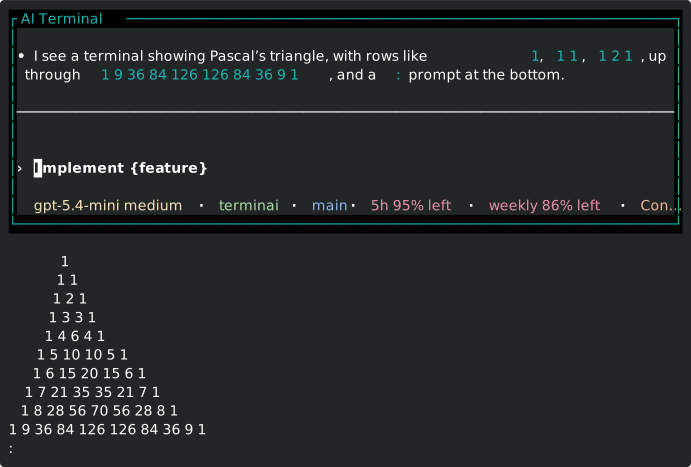
Queue safe shell input
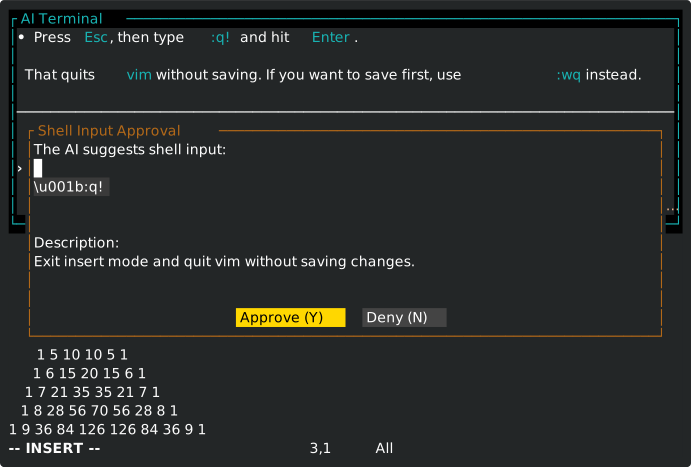
Agent support
Use the AI CLI you trust
Terminai does not own your model credentials or provider routing. Your configured CLI handles auth and model selection; Terminai provides the terminal wrapper, MCP server, and approval flow. Terminai never collects your data or makes outgoing network connections.
Codex
Bundled preset injects Terminai MCP tools and context into Codex.
Claude Code
Bundled preset starts Claude with Terminai MCP preconfigured.
Custom
Point Terminai at any CLI (ideally one that can consume the MCP URL and context prompt). See config.
Get started
Install, authenticate, launch
Install Terminai, sign in to your preferred AI CLI, then add a profile to your terminal emulator of choice that starts terminai or terminai -- <command> [arg1 arg2...]
Supports Linux and macOS and has been minimally shown to work on Windows.
Homebrew
brew install emosenkis/tap/terminaiBuild from source
git clone https://github.com/emosenkis/terminai.git
git submodule init
git submodule update
cd terminai
cargo install --path src
GitHub releases
Download and unpack from https://github.com/emosenkis/terminai/releases
Acknowledgements
Built on excellent terminal tooling
Terminai was initially forked from mprocs, which provided the vt100 host & guest support. It also relies on its own forks of Ratatui and rat-salsa which add functionality needed to preserve native scroll and copy.
Terminai was built to a great extent using Claude and Codex (on top of the solid foundation provided by mprocs) with some hand-written portions to get past the parts AI struggled with most, native scrolling and input handling. It is alpha-quality software and although I use it as my daily driver, please ensure if you use it that you have an easy way to spawn a regular AI-free shell.